
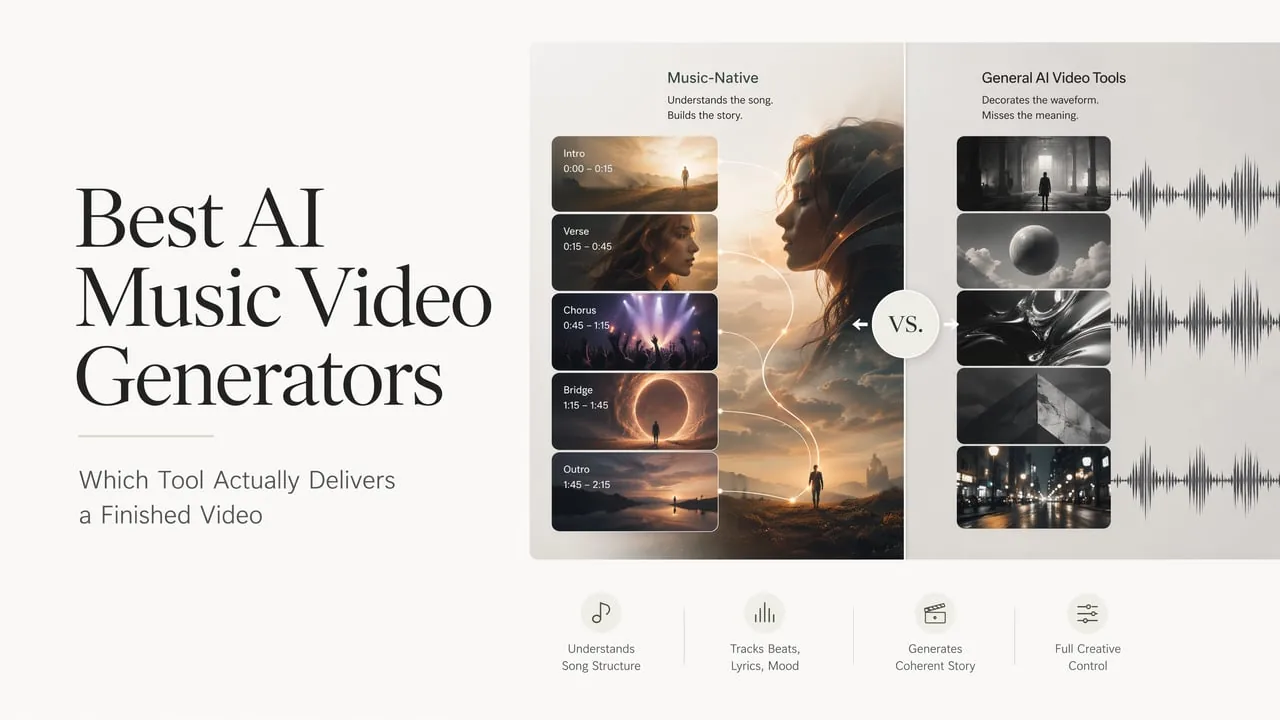
AI music video generators have crossed an important threshold. Twelve months ago, beat-sync was a novelty — a feature worth bragging about on a landing page. Today it is a baseline. If a tool cannot line visuals up with downbeats and lyrics, it no longer reads as a serious option. The real differentiator in 2026 is something harder to advertise: whether the tool understands your song as a structured musical experience, or merely treats it as a waveform to decorate.
That distinction shapes every recommendation in this list. Some tools start from audio and build visuals around it. Others start from text prompts and generate video with no audio awareness. The workflow gap between those two approaches is larger than most comparison posts acknowledge, and it is the single biggest factor in whether you end up with a video you want to release or a series of clips you hope nobody sees.
What Separates a Music Video Generator From a General AI Video Tool
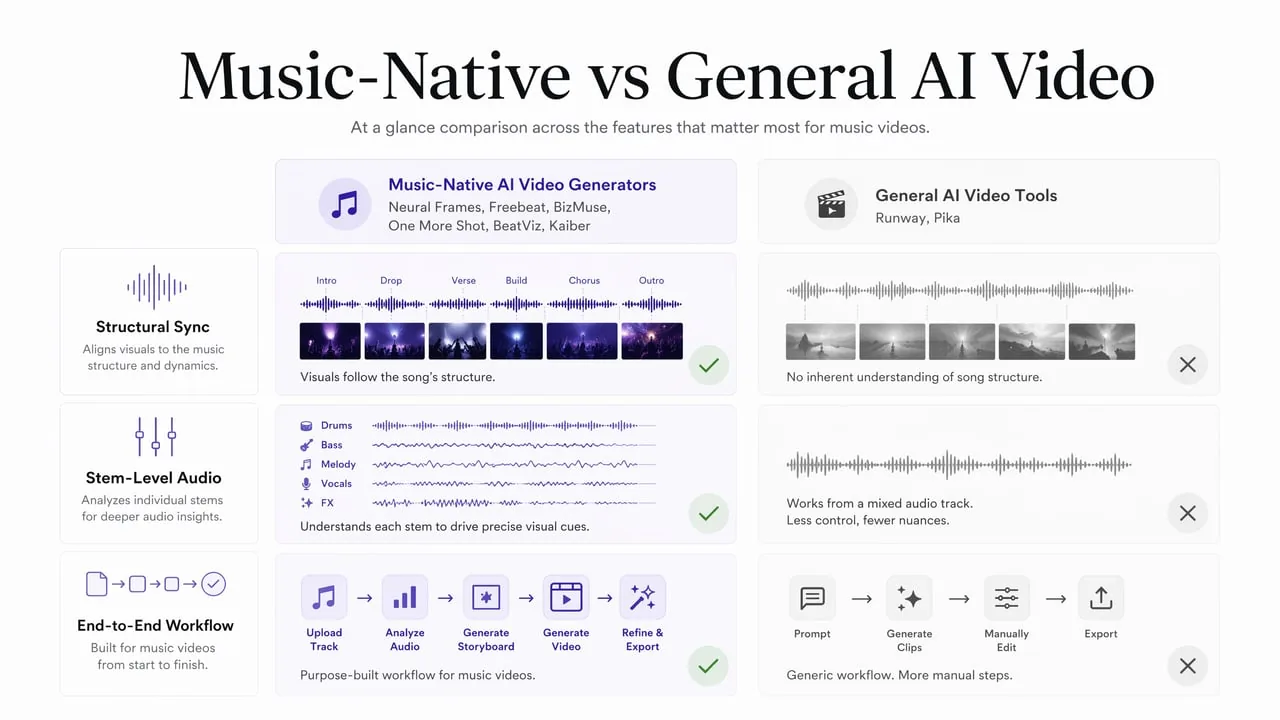
Before the list, a quick filter. Many platforms marketed as AI music video generators are actually general text-to-video tools with an audio upload button added after the fact. The difference matters because a general tool generates clips that happen to play alongside a song. A music-native tool generates visuals structured around verses, choruses, drops, and transitions.
Here are the three criteria this list uses to separate the two:
- Structural synchronization. Does the tool detect song sections — verse, chorus, bridge — and plan visuals accordingly, or does it fire on a flat beat grid?
- Stem-level audio analysis. Can the tool isolate drums, bass, vocals, and melody separately to drive different visual layers?
- End-to-end workflow. Does the platform take you from audio upload through scene planning, generation, refinement, and export without forcing you into external editing software?
Every tool on this list clears the first bar: it can produce a watchable music video from an audio upload. The ranking reflects how well each one handles the three criteria above and what kind of creator it actually serves.
The 8 Best AI Music Video Generators at a Glance
| Tool | Best For | Music-Native | Starting Price | Output Resolution |
|---|---|---|---|---|
| BizMuse | Concept-to-video creative workflow | Yes (song-direction-first) | Credit-based | Up to 1080p |
| Neural Frames | Professional music video production | Yes (8-stem) | $19/mo | Up to 4K |
| Freebeat | Social media creators | Yes (agent-based) | $4.99/wk | 720p-1080p |
| Kaiber | Artistic and experimental visuals | Partial (audio-reactive) | $5/mo | 1080p |
| One More Shot AI | Lip-sync performance videos | Yes (waveform analysis) | $19.99/mo | 1080p |
| BeatViz | Speed and guided creation | Yes (guided workflow) | Freemium | 1080p |
| Runway | General AI video with pro editing | No (text-to-video core) | $12/mo | Up to 4K |
| Pika | Budget social media clips | No (prompt-to-video) | $6/mo | 480p-1080p |
BizMuse — The Best Concept-First AI Music Video Generator
BizMuse takes the top spot because it solves a problem every other tool on this list sidesteps: the gap between having a song and knowing what the video should look like. Instead of asking you to upload a track and hit generate, BizMuse starts with song direction: genre, mood, lyrics, tempo, hook, audience, and the visual world you want to build. The workspace then helps you plan matching video scenes, choose the right AI model for each scene, review estimated credit costs before committing, and iterate on the strongest results.
This concept-first workflow functions as a creative brief tool and a generation workspace in one. You define the visual identity upfront — style, palette, character direction — and the platform helps you translate that into scene-level generation decisions. For musicians, marketing teams, and creators who want to direct a music video rather than prompt one into existence, this approach is a genuine workflow upgrade.
Scene-level refinement is another practical strength unique to BizMuse. Instead of regenerating an entire video to fix one weak moment, you adjust individual scenes without touching the rest of the timeline. The release cut builder then assembles the best takes into a final export ready for TikTok, Reels, Shorts, and YouTube. BizMuse supports songs up to five minutes and integrates multiple AI music and video models with transparent credit estimation per scene — so you know what a generation will cost before you commit, rather than discovering the bill after the render.
BizMuse is the best choice for creators who want to direct their music video with intention — defining the concept, visual identity, and scene structure before a single frame is generated.
Neural Frames — The Professional Standard for 4K Production
Neural Frames is the tool that feels built by people who actually make music videos. Its signature feature is 8-stem audio analysis: the AI splits your track into drums, bass, vocals, melody, and more, then maps each stem to specific visual triggers. The snare drives the cut. The vocal entry shifts the color palette. The bass drop triggers a camera move. This is not beat-sync in the marketing sense — it is structural synchronization that understands musical phrasing.
The platform includes a real timeline editor with keyframe control, meaning you can pin prompts to timestamps and iterate on individual scenes without regenerating the entire video. Autopilot mode analyzes your song and builds a complete storyboard in minutes, which you can then refine scene by scene. Output goes up to 4K with multiple aspect ratios for YouTube, TikTok, and Spotify Canvas.
The trade-off is credit math. A single Autopilot video burns roughly 850 to 900 credits on the Knight plan (2,400 credits for $26/month billed yearly), so you get about two full videos per month at the entry paid tier. For serious production, the Ninja plan at $99/month is the realistic starting point. Neural Frames is ideal for musicians who need 4K output with frame-level control and are willing to pay for that quality — pair it with BizMuse for concept planning and you have a complete production pipeline.
Freebeat — Built for the Social Feed
Freebeat takes an agent-based approach: instead of generating one clip at a time, the AI plans a complete music video — storyboard, shot selection, transitions, and timing — from your uploaded track. The resulting workflow feels closer to handing a brief to a video editor than to prompting a generation model.
The platform supports lip-sync, face-swap, and integrates over 70 AI models including Veo 3.1, Sora 2, Kling 2.6, and Runway Gen-3 under one roof. For TikTok and Reels creators who need frequent, beat-synced content without touching a timeline, Freebeat delivers speed at a low entry price. The free tier includes a watermark, and paid plans start at $4.99 per week. Output resolution caps at 1080p depending on plan, and videos are generally limited to around six minutes — more than enough for social, less suited for long-form YouTube releases.
Trustpilot reviews are mixed. Some users report smooth, creative results. Others note occasional synthetic artifacts and continuity issues between scenes. Freebeat is strongest when speed and volume matter more than frame-level polish.
Kaiber — The Artist's Playground
Kaiber built its reputation on the trippy, fluid animation style that defined early AI music videos. Its audio-reactive engine and Superstudio creative canvas let you generate visuals from text, images, or songs with frame-by-frame control through Flipbook mode. The platform supports multiple AI models including Kling, Luma, Veo, and Minimax within a unified workspace.
The pricing looks attractive at $5 per month for the Explorer plan, but the credit system bites hard in practice. Every preview generation consumes credits, and many users report burning through hundreds of credits just experimenting to land on one final video they like. In 2026, Kaiber faces a tougher competitive landscape — tools like Kling and Seedance 2.0 now cover similar music-video animation at lower effective cost, and the community rating has settled around 2.9 out of 5 across review platforms. Kaiber remains a solid choice for creators who prioritize artistic style and fluid animation over structural synchronization, but the credit friction makes it harder to recommend as a daily driver.
One More Shot AI — Lip-Sync Specialist
One More Shot AI is one of the few tools focused entirely on AI music videos rather than general video generation. Its core strength is lip-sync: upload a track from Suno, Udio, or any music source, and the AI generates a virtual performer whose mouth movements align with the vocals. The platform also supports virtual artist creation with consistent visual identity across multiple videos — useful for AI musicians building a recognizable brand.
The catch is pricing transparency. The entry plan sits at $19.99 per month, but a four-minute video can consume roughly 8,000 tokens, which requires the $99 Hyper plan or a $99 token pack. User reviews on the App Store are modest (2.3 stars across limited ratings), with common complaints about confusing credit requirements and output that does not always match expectations. One More Shot works best for creators who specifically need lip-synced performance videos and understand the real per-video cost before subscribing.
BeatViz — Speed Above All
BeatViz competes on rendering speed, claiming minute-level delivery for a fully assembled music video. Its guided workflow takes you from a simple text idea through AI-assisted scene planning and assembly without requiring audio upload — the platform can also generate original background music based on your text prompt. A timeline editor is available for creators who want frame-level control, but the core pitch is getting from idea to finished video in minutes rather than hours.
BeatViz is newer and less documented than the tools above. Community feedback is still thin. For creators who value speed and want a guided, low-friction experience from concept to export, it is worth testing — particularly given the freemium entry.
Runway — The Power Tool (Without the Music Brain)
Runway is the most capable AI video platform on this list in terms of raw generation power. Gen-4.5, its flagship model, produces cinematic clips with character consistency, lighting control, and smooth transitions that rival professional production. The Aleph in-video editing system lets you modify generated footage through text prompts without regenerating. Act-Two brings professional motion capture to anyone with a camera.
But Runway is not a music video generator. It is a text-to-video and image-to-video platform that happens to accept audio files. There is no stem analysis, no structural synchronization, and no music-aware scene planning. If you are a filmmaker or VFX artist who needs AI video for any creative project including music videos, and you are comfortable building your own music-video workflow on top of raw generation tools, Runway is unmatched. Plans start at $12 per month with 625 monthly credits — but Gen-4.5 burns 25 credits per second, so the Standard plan yields roughly 25 seconds of flagship-model output per month.
Pika — The Budget Entry Point
Pika is the most affordable way to start generating AI video clips. At $6 to $8 per month for the paid tiers, it covers short-form social content with creative effects like Pikascenes, Pikatwists, and Pikaformance for audio-driven lip-sync. The free tier gives 80 monthly credits for testing before committing.
Pika is not music-native and not designed for full music video production. It works best for creators who need short, social-ready clips with fun effects, or who want to prototype visual ideas before investing in a dedicated music video tool. For $0.48 per 5-second 1080p clip at the paid tier, it is one of the cheapest ways to explore AI video generation — just do not expect structural music synchronization.
What a Finished Music Video Actually Costs
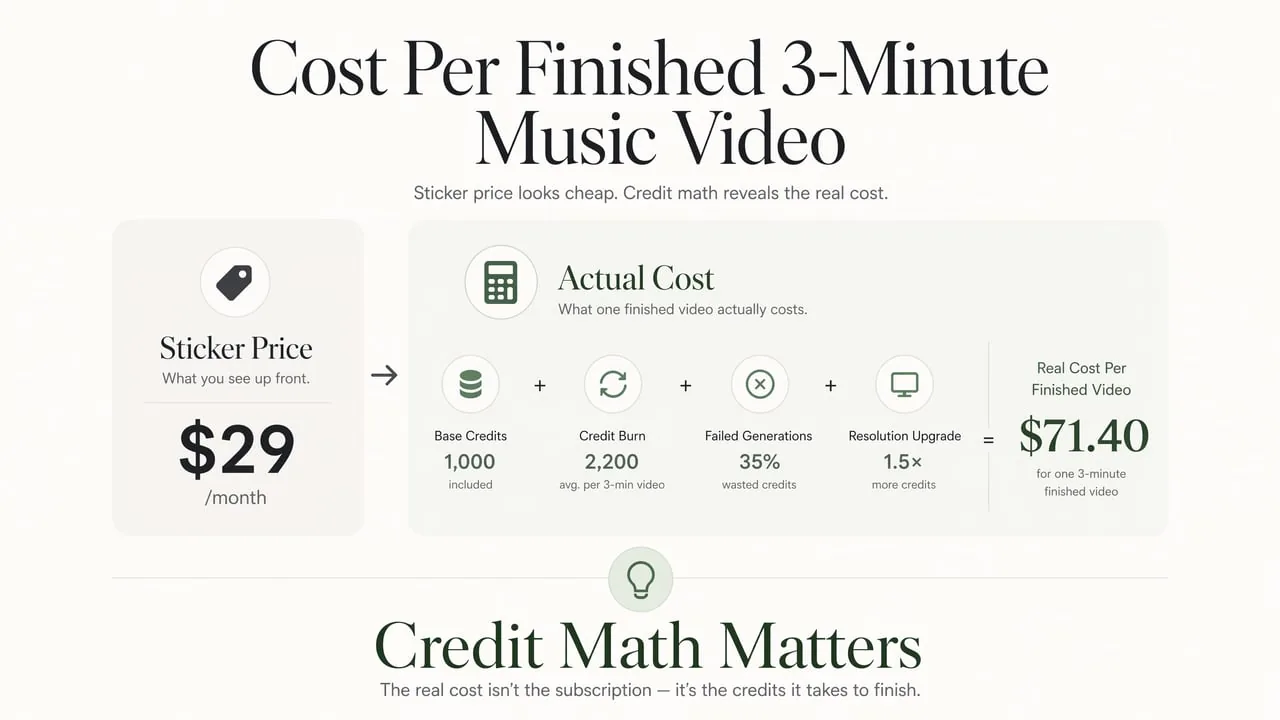
Sticker prices in this category are misleading. The number that matters is not the monthly subscription — it is what one finished music video costs after accounting for credit burn, failed generations, and resolution upscaling.
| Tool | Entry Plan (Monthly) | Estimated Cost Per Finished 3-Minute Video | Commercial License Included? |
|---|---|---|---|
| BizMuse | Credit-based | Varies by model and scene count; estimate before generation | Depends on model and plan |
| Neural Frames | $26/mo (Knight) | ~$13 (uses ~900 of 2,400 credits) | Yes, on paid plans |
| Freebeat | $4.99/wk (Basic) | ~$5 (one video consumes most weekly credits) | Yes, on paid plans |
| Kaiber | $5/mo (Explorer) | ~$10-$25 (credit burn varies widely) | Yes, on paid plans |
| One More Shot AI | $19.99/mo (Super) | ~$99 (4-min video ~8,000 tokens, requires Hyper plan) | Yes, on paid plans |
| BeatViz | Freemium | Freemium test; paid tiers TBD | Check current plan terms |
| Runway | $12/mo (Standard) | ~$60+ (Gen-4.5 at 25 credits/sec; 3 min = 4,500 credits) | Yes, on paid plans |
| Pika | $8/mo (Standard) | ~$10-$20 (40 credits per 5-sec clip at 1080p) | Standard plan and above |
Credit math is the hidden variable most comparison posts skip. A tool that looks cheaper at the subscription level can cost more per finished video once you account for how aggressively it burns credits on each generation. BizMuse stands out here by letting you estimate credit costs per scene before you generate — so you always know what you are committing to. Always check the per-second or per-scene credit cost for the model you plan to use, and budget for failed generations — they happen on every platform.
How to Pick the Right AI Music Video Generator
The right tool depends less on features and more on how you work. Use this decision framework to narrow the field:
If you want to direct your music video with a clear creative vision, start with BizMuse. Its concept-first workflow lets you define the visual direction, plan scenes, and estimate costs before generating — ideal for musicians and teams who treat video as a creative production, not a content afterthought.
If you need maximum output quality and 4K resolution, Neural Frames delivers professional-grade production with 8-stem audio analysis and a full timeline editor. Pair it with BizMuse for concept planning to get the best of both worlds.
If you create short-form content for TikTok, Reels, and Shorts, Freebeat offers the best speed-to-cost ratio for frequent social output. BeatViz is worth testing if rendering speed is your top priority and you are comfortable with a newer platform.
If you are building a virtual artist with a consistent visual identity, One More Shot AI handles lip-sync and character consistency in one workflow, and BizMuse lets you define and maintain visual identity across an entire release cycle through its song-direction-first approach.
If you want to experiment with AI video on a budget, Pika at $6 to $8 per month is the lowest-risk entry point. Just understand the limitations: no music-aware scene planning, and output quality caps at the budget tier.
If you already use professional editing tools and just need raw AI clips, Runway gives you the most powerful generation engine on the market. Be prepared to build your own music-video workflow on top of it.
The category has matured enough that there is no single best tool — only the right tool for your specific creative workflow. The important thing is to pick one that matches how you actually work, not the one with the flashiest demo reel.
Frequently Asked Questions
Can I use AI-generated music videos commercially?
It depends on the platform and your subscription tier. Most paid plans on BizMuse, Neural Frames, Freebeat, Kaiber, Runway, and Pika include commercial usage rights — though BizMuse terms vary by model and plan, so check the specific model license before publishing. Always verify the current license page before releasing content to streaming platforms, as terms can change between billing cycles.
Do I need to own the music I upload?
Yes. You must have the rights to any audio you upload, whether it is your original recording, an AI-generated track you have commercial rights to (such as Suno Pro or ElevenLabs paid-tier output), or licensed material. Most platforms' terms explicitly place this responsibility on you.
Can these tools generate the music and the video together?
Some can. BeatViz can compose original background music from a text prompt. Freebeat integrates with Suno and Udio for music generation alongside video. Most other tools expect you to upload a finished audio file and focus exclusively on the visual side. BizMuse supports both AI music generation and AI video generation within the same workspace, with credit estimation for each — so you can build the full package in one place.
How long does it take to generate a full music video?
Anywhere from 5 to 30 minutes depending on the tool, song length, and generation queue. BeatViz and Freebeat are the fastest, often delivering in under 10 minutes. Neural Frames Autopilot takes 10 to 15 minutes for storyboard plus generation. BizMuse takes a concept-first approach where you spend time upfront planning the visual direction, which leads to fewer failed generations and faster final output overall.
What is the difference between audio-reactive and structurally synchronized?
Audio-reactive means visuals respond to volume or a basic beat grid — the screen pulses when the kick drum hits. Structurally synchronized means the AI understands song sections (verse, chorus, bridge) and plans visual changes around musical phrasing, not just amplitude. Neural Frames and Freebeat offer structural synchronization. BizMuse takes this further by letting you define the structural mapping yourself through the concept planning stage. Tools like Kaiber and Pika are audio-reactive. The difference is most visible in how a video handles a quiet bridge or a buildup: a structurally synchronized tool changes the visual language, while an audio-reactive tool just dims the lights.